Track production deployment events
Automatically track production deployment events
You can automatically record your code deployments or system configuration changes in DEM:
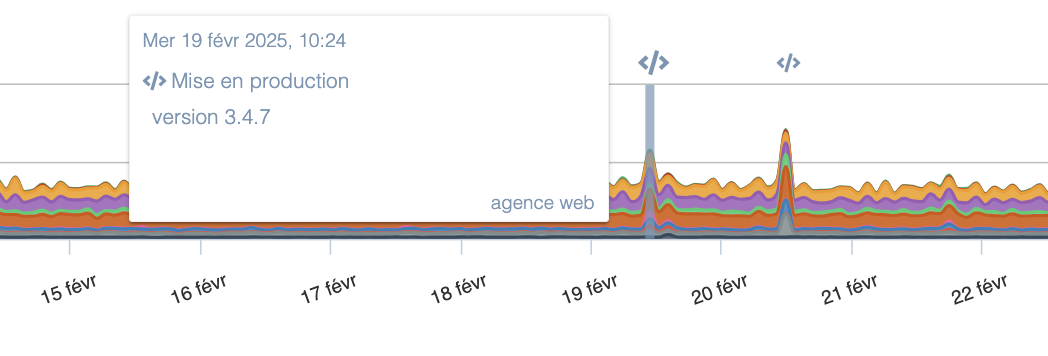
These events can be created automatically via our API. The best practice is to integrate a call to our API in your deployment scripts and in your configuration management tooling where appropriate.
How the API works
Our API is triggered with a simple HTTP call to the URL "https://app.quanta.io/api/events/push". The parameters to provide are:
- type: The event type. It may have one of the following values:
- code_deploy (code deployment)
- config_change (system configuration change)
- comment (comment)
- cron (scheduled task)
- custom (generic event)
- content: The message associated with the event. This can be the application version or a description of the changes made. This field is free-form.
Authentication and token generation
You must also provide an API token to authenticate the request. This token can be generated from the "Integrations" section of your site settings in DEM. You can also add a custom icon.
This token should be provided:
- Either in the HTTP header "Authorization" as
Authorization: Token <your_token> - Or passed directly in the request by adding the parameter
?auth_token=<your_token>at the end of the URL.
Usage examples
Here's an example cURL request that adds a code deployment event with the message "version 42.0". Note the presence of the "Content-Type" header which is required for our API to accept the request:
curl -L -m 10 -X POST -d '{"type": "code_deploy", "content": "version 42.0"}' -H 'Content-Type: application/json' -H 'Authorization: Token 78e64233e09d3d8ec7bf73c4d9ea8a8851badbd216' https://app.quanta.io/api/events/push
If you need to send events from a service that cannot perform POST requests, you can also send a GET request using the API. For example, the following command adds a generic ("custom") event using cURL:
curl -L -m 10 "https://app.quanta.io/api/events/push?content=bonjour&type=custom&auth_token=78e64233e09d3d8ec7bf73c4d9ea8a8851badbd216"
In the 2 commands above, the cURL option -m sets a timeout of 10 seconds to avoid blocking your scripts in case our API is temporarily unavailable.
Our API returns an HTTP 200 on success and a 4xx or 5xx code on error. The response includes JSON with an "error" field on failure or "success" on success.