Introduction to CMA
Introduction
The Centreon Monitoring Agent (CMA) is a piece of software installed on the host it monitors: it collects metrics and computes statuses, and sends them to Centreon.
The agent can execute native checks, or use Centreon plugins to execute non-native checks. Native checks are run directly by the agent (as opposed to non-native checks, which require local plugins to be installed on the host). Native checks have better performance and a better footprint (reduced CPU and memory usage).
Both native and non-native checks are defined in either the Linux Centreon Monitoring Agent connector or the Windows Centreon Monitoring Agent connector. The connectors provide the templates and the agent retrieves the configuration of these checks at regular intervals after the connection has been established.
The agent performs the checks (for non-native checks, using the local plugins) and sends the data to the poller. The part of the poller's Engine that receives data from the agent is called the OTLP receiver (OTLP means OpenTelemetry protocol).
Custom Nagios-compatible plugins can also be used with this agent.
When do I need to use an agent?
Use the CMA agent:
- when security policies only allow outgoing flows (no checks can be performed by pollers, SNMP is not authorized).
- on sites that have no local poller.
- when you need to run a script locally on the monitored machine for security (rights and/or protocols) or performance reasons.
OSs you can monitor with CMA
The CMA can be installed on and monitor the following OSs:
- Linux
- Windows
- RHEL/Oracle Linux/Alma Linux 8
- RHEL/Oracle Linux/Alma Linux 9
- RHEL/Oracle Linux/Alma Linux 10
- Debian 12
- Debian 13
- Ubuntu 22.04/24.04 LTS
- Windows 10
- Windows 11
- Windows Server 2016
- Windows Server 2019
- Windows Server 2022
- Windows Server 2025
Applications you can monitor with CMA
-
Included with the Centreon connectors:
-
You can also develop your own plugins.
How do the host and the poller interact?
Connection direction
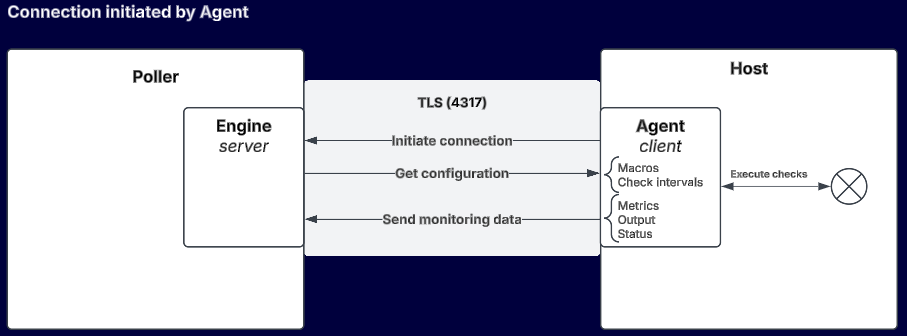
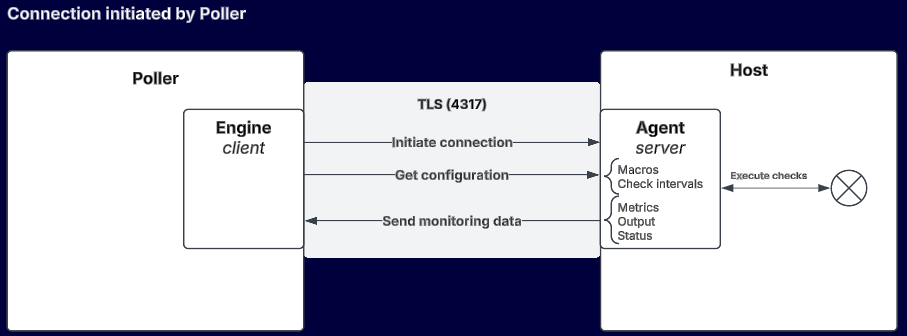
Depending on the case, either the agent or the poller initiates the connection.
Please note that the two connection modes described below only apply to establishing the connection. Once the connection is established, the behavior of the agent (scheduling checks, reporting information) and the collector (alerts, configuration sending) is strictly identical in both cases, and the connection is bidirectional.
- In the case of an agent-initiated connection, you simply configure the poller to listen on a specific port. A poller can receive data from n agents/hosts.
- If the agent is not allowed to connect to the poller for security reasons (e.g. when the poller is in a DMZ), you can use a poller-initiated connection. You need to declare in Centreon each host that will be monitored by this agent in the **Configuration > Poller > Agent configurations menu. The poller will receive data from n hosts via the agent.
The two connection directions can be combined within the same poller, depending on the type of your monitored fleet.
Securing the connection
The connection between the poller and the agent must be secure in production. You must use:
Compatibility between agent and poller versions
Starting with version 25.10, the connection between the agent and the poller is more strictly secured: a valid authentication token is required as soon as either component (the agent or the poller/platform) runs version 25.10 or later. In version 24.10, connections without a token are still tolerated as a transitional behavior.
If you operate a fleet with agents and pollers on different versions (for example during a progressive upgrade), the behavior depends on the version of each component:
| Agent | Poller / platform | Without an authentication token | With a valid authentication token |
|---|---|---|---|
| 24.10 | 24.10 | Allowed (transitional behavior) | Works |
| 25.10 | 24.10 | Allowed (transitional behavior) | Works |
| 24.10 | 25.10 | Refused by the poller | Works |
| 25.10 | 25.10 | Refused by the poller | Works |
We recommend always configuring an authentication token, regardless of the version, to avoid any monitoring interruption when the platform is upgraded.
In addition, some agent capabilities introduced in version 25.10 rely on support from the Engine on the poller side, and therefore only work when both the agent and the poller run version 25.10 or later:
| Agent capability (new in 25.10) | Poller 25.10 + agent 24.10 | Poller 24.10 + agent 25.10 |
|---|---|---|
Custom commands (custom) | ❌ | ✅ |
| Check timeperiods | ❌ | ❌ |
| SOFT/HARD retry handling | ❌ | ❌ |
Credentials encryption (encrypt::) | ❌ | ❌ |
| Host auto-registration | ❌ | ❌ |
| Forced checks | ❌ | ❌ |
Basic native checks (CPU, memory, storage, uptime, Windows services, event log, processes, scheduled tasks, performance counters, etc.) remain available regardless of the version combination.
Operating diagram
- Agent connects to poller
- Poller connects to agent