ServiceNow
How it works
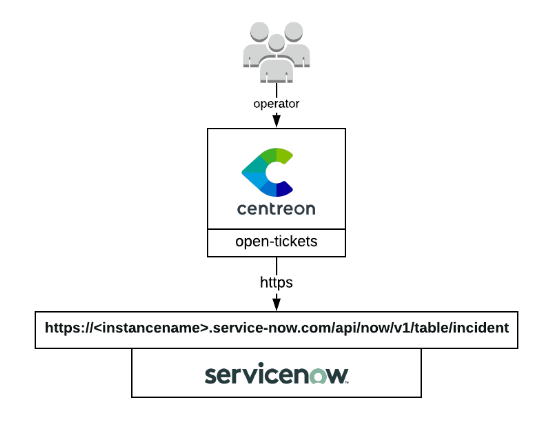
ServiceNow open-tickets provider uses the ServiceNow REST API to get configuration data and open incidents about your monitoring alerts. Since it gathers a lot of configurations objects from ServiceNow, it puts them in cache. Loging out or waiting 10 hours will flush the cache.
Compatibility
This integration is (at least) compatible with the following ServiceNow versions and latest version of ServiceNow:
- Madrid
- London
- New York
Feature information
| Open ticket | Close ticket (from Centreon to ServiceNow) | Handle custom fields |
|---|---|---|
| ✓ | ✘ | ✘ |
Requirements
You need to configure Open Tickets in order for resources (hosts and services) to receive a ticket number.
Our provider requires the following parameters:
| Parameter | Example of value |
|---|---|
| Instance Name | MyCompany |
| OAuth Client ID | xxxxxxxxx |
| OAuth Client Secret | yyyyyyyy |
| Username | centreon |
| Password | MyPassword |
| Protocol | https |
| Timeout | 60 |
Network flow
| Source | Destination | Protocol/Port |
|---|---|---|
| Centreon central server | ServiceNow instance | TCP/443 (https) or TCP/80 (http) |
Account
You need the following information:
- Client ID
- Client secret
- Username
- Password
- Instance name
The aforementioned account must at least be able to open a ticket through the ServiceNow Table REST API. This is a POST action into the incident table.
The connector will also try to access the following tables from the API depending on the configuration of your open ticket rule:
- sys_user table
- sys_user_group table
- sys_choice
Some test commands that you can run from your Centreon central server are available in the Test commands section.
Retrieved data
This open ticket connector can retrieve the following information from your ServiceNow instance:
- Categories
- Subcategories
- Impact
- Urgency
- Severity
- Assignment Group
- Assignment
If you need more information regarding retrieved data from an open ticket connector, please read the retrieved data chapter from the Open Ticket global documentation.
Test commands
The curl commands listed below must be run from your central server. You need to replace everything between <>. For example <server_address> may be replaced with service-now.com.
Get oauth tokens
curl --location 'https://<instance_name>.<server_address>/oauth_token.do' \
--header 'Content-Type: application/x-www-form-urlencoded' \
--data-urlencode 'grant_type=password' \
--data-urlencode 'client_id=<client_id>' \
--data-urlencode 'client_secret=<client_secret>' \
--data-urlencode 'username=<username>' \
--data-urlencode 'password=<password>'
Get ServiceNow severities
curl --location 'https://<instance_name>.<server_address>/api/now/table/sys_choice?sysparm_fields=value%2Clabel%2Cinactive&sysparm_query=nameSTARTSWITHincident%5EelementSTARTSWITHseverity' \
--header 'Authorization: Bearer <authentication_token>' \
--header 'Content-Type: application/json'
Get ServiceNow urgencies
curl --location 'https://<instance_name>.<server_address>/api/now/table/sys_choice?sysparm_fields=value,label,inactive&sysparm_query=nameSTARTSWITHincident%5EelementSTARTSWITHurgency' \
--header 'Authorization: Bearer <authentication_token>' \
--header 'Content-Type: application/json'
Get ServiceNow impact
curl --location 'https://<instance_name>.<server_address>/api/now/table/sys_choice?sysparm_fields=value,label,inactive&sysparm_query=nameSTARTSWITHtask%5EelementSTARTSWITHimpact' \
--header 'Authorization: Bearer <authentication_token>' \
--header 'Content-Type: application/json'
Get ServiceNow categories
curl --location 'https://<instance_name>.<server_address>/api/now/table/sys_choice?sysparm_fields=value,label,inactive&sysparm_query=nameSTARTSWITHincident%5EelementSTARTSWITHcategory' \
--header 'Authorization: Bearer <authentication_token>' \
--header 'Content-Type: application/json'
Get Service Now subcategories
curl --location 'https://<instance_name>.<server_address>/api/now/table/sys_choice?sysparm_fields=value,label,inactive&sysparm_query=nameSTARTSWITHincident%5EelementSTARTSWITHsubcategory' \
--header 'Authorization: Bearer <authentication_token>' \
--header 'Content-Type: application/json'
Get ServiceNow users
curl --location 'https://<instance_name>.<server_address>/api/now/table/sys_user?sysparm_fields=sys_id,active,name' \
--header 'Authorization: Bearer <authentication_token>' \
--header 'Content-Type: application/json'
Get ServiceNow user groups
curl --location 'https://<instance_name>.<server_address>/api/now/table/sys_user_group?sysparm_fields=sys_id,active,name' \
--header 'Authorization: Bearer <authentication_token>' \
--header 'Content-Type: application/json'
Open a ticket
Keep in mind that the data in the command down below is just an example and your ServiceNow instance may ask you to add mandatory data
curl --location 'https://<instance_name>.<server_address>/api/now/table/incident' \
--header 'Content-Type: application/json' \
--header 'Accept: application/json' \
--header 'Authorization: Basic <authentication_token>' \
--data '{
    "short_description": "This a test ticket",
    "description": "Believe it or not, but it is just a test."
}'