Adding event markers to charts
When something changes in production — a new deployment, a configuration update, a scheduled task — it can directly affect your monitoring data. Correlating these events with performance metrics helps you understand whether a spike in errors or a drop in availability is linked to a recent change.
You can make markers appear on all your graphs, so you can instantly see whether a change in your metrics coincides with a deployment or configuration update.
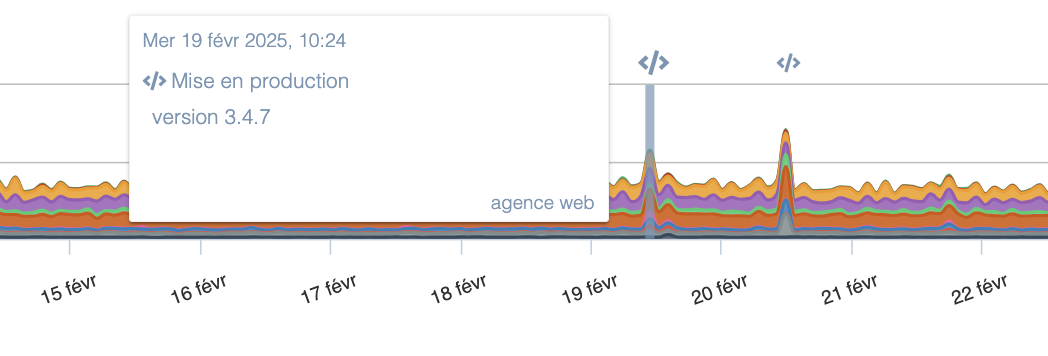
These events can be created automatically via our API. The best practice is to integrate a call to our API in your deployment scripts and in your configuration management tooling where appropriate.
How the API works
Our API is triggered with a simple HTTP call to the URL https://app.quanta.io/api/events/push. The parameters to provide are:
- type: The event type. It may have one of the following values:
- code_deploy (code deployment)
- config_change (system configuration change)
- comment (comment)
- cron (scheduled task)
- custom (generic event)
- content: The message associated with the event. This can be the application version or a description of the changes made. This field is free-form.
Authentication and token generation
You must also provide an access token to authenticate the request. You can also add a custom icon.
This token should be provided:
- Either in the HTTP header "Authorization" as
Authorization: Token <your_token> - Or passed directly in the request by adding the parameter
?auth_token=<your_token>at the end of the URL.
Usage examples
Here's an example cURL request that adds a code deployment event with the message "version 42.0". Note the presence of the "Content-Type" header which is required for our API to accept the request:
curl -L -m 10 -X POST -d '{"type": "code_deploy", "content": "version 42.0"}' -H 'Content-Type: application/json' -H 'Authorization: Token <your_token_here>' https://app.quanta.io/api/events/push
If you need to send events from a service that cannot perform POST requests, you can also send a GET request using the API. For example, the following command adds a generic ("custom") event using cURL:
curl -L -m 10 "https://app.quanta.io/api/events/push?content=bonjour&type=custom&auth_token=<your_token_here>"
In the 2 commands above, the cURL option -m sets a timeout of 10 seconds to avoid blocking your scripts in case our API is temporarily unavailable.
Our API returns an HTTP 200 on success and a 4xx or 5xx code on error. The response includes JSON with an "error" field on failure or "success" on success.