Configurations simples de collecteur
Voici deux exemples de configurations simples. Si vous souhaitez collecter plusieurs types de logs à partir d'un même hôte, utilisez la page Configuration complète de collecteur (sources de logs multiples).
Exemple 1 : Configuration rapide pour commencer à collecter les logs de l'Observateur d'événements Windows
-
Sur une machine Windows, installez l'OpenTelemetry Collector.
-
Dans Centreon Log Management (CLM), générez un jeton pour authentifier l'hôte auprès de votre plateforme CLM.
-
Sur votre machine Windows, modifiez le fichier config.yaml qui a été créé dans le répertoire où vous avez installé OpenTelemetry Collector. Par défaut, il se trouve ici :
C:\Program Files\OpenTelemetry Collector\config.yaml -
Remplacez le contenu du fichier par l'extrait ci-dessous (remplacez mytoken par votre jeton). Veillez à enregistrer le fichier en tant qu'administrateur.
# Copyright 2025 Centreon.
# SPDX-License-Identifier: Apache-2.0

exporters:
  otlphttp/centreon: # The exporter that will send logs to CLM
    endpoint: "https://api.euwest1.obs.mycentreon.com/v1/ingress/otlp"
    headers:
      "X-Api-Key": "mytoken" ## Replace mytoken by your actual token
  debug: # The exporter that will write debug info to log files
    verbosity: detailed

processors:
  batch: # This processor optimizes performance.
  resourcedetection: # This processor enriches ALL logs with the information defined below.
    detectors: ["system"]
    system:
      resource_attributes: # Each log entry will include the 4 attributes listed below.
        host.name:
          enabled: true
        os.name:
          enabled: true
        os.type:
          enabled: true
        os.version:
          enabled: true

receivers:
  windowseventlog/application:
    channel: application
    operators:
      - type: severity_parser
        parse_from: body.level
        overwrite_text: true
        mapping:
          fatal:
            - Critical
            - Critique
          error:
            - Error
            - Erreur
          warn:
            - Warning
            - Avertissement
          info:
            - Informational
            - Information
      - type: copy
        from: body.execution.process_id
        to: attributes["process.pid"]
      - type: copy
        from: body.provider.name
        to: resource["event.provider.name"]
      - type: copy
        from: body.provider.guid
        to: resource["event.provider.guid"]
        if: "body.provider.guid != ''"
      - type: copy
        from: body.event_id.id
        to: attributes["event.id"]
      - type: copy
        from: body.record_id
        to: attributes["event.record.id"]
      - type: copy
        from: body.task
        to: attributes["event.task"]
      - type: move
        from: body.message
        to: body
      - type: add
        field: resource["service.version"]
        value: "1.0.0"
      - type: add
        field: resource["service.name"]
        value: "windows-event-log"
      - type: add
        field: resource["service.namespace"]
        value: "application"

service:
  pipelines: # This defines the order in which the collector runs its components.
    logs:
      receivers: [windowseventlog/application]
      processors: [batch, resourcedetection]
exporters: [otlphttp/centreon] -
redémarrez le service OpenTelemetry Collector.
net stop otelcol-contrib
net start otelcol-contrib
Vous devriez commencer à recevoir des logs dans Centreon Log Management.
Exemple 2 : Un fichier de configuration avec 3 sources de logs
Dans l'exemple suivant, nous recevons des données provenant de trois sources différentes sur le même serveur Windows. Les logs transitent par un seul pipeline. Toute la configuration est regroupée dans le fichier config.yaml du collecteur. (Suivez la même procédure que pour l'exemple 1 et adaptez le fichier de configuration ci-dessous.)
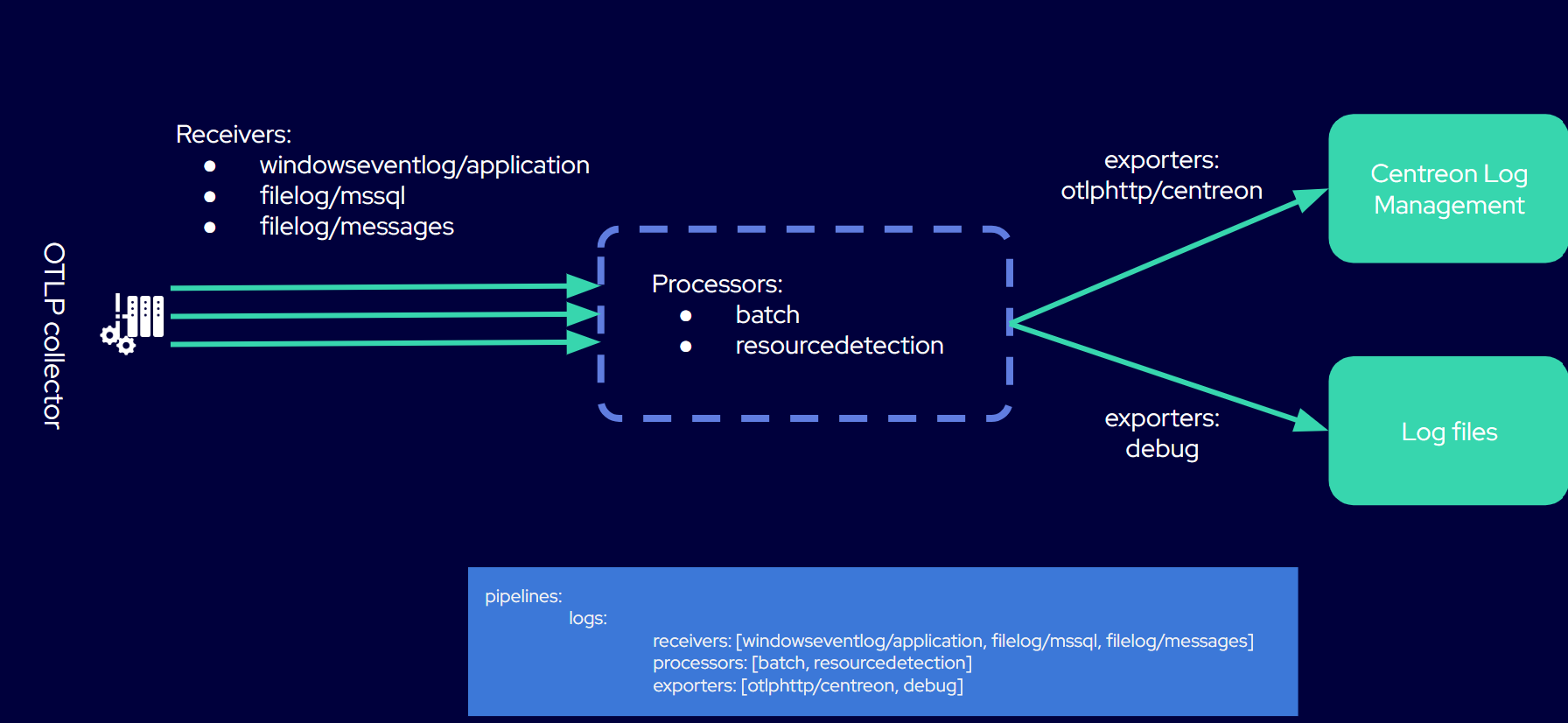
# Copyright 2025 Centreon
# SPDX-License-Identifier: Apache-2.0

exporters:
  otlphttp/centreon: # The exporter that will send logs to CLM
    endpoint: "https://api.euwest1.obs.mycentreon.com/v1/ingress/otlp"
    headers:
      "X-Api-Key": "mytoken" ## Replace mytoken by your actual token
  debug: # The exporter that will write debug info to log files
    verbosity: detailed

processors:
  batch: # This processor optimizes performance.
  resourcedetection: # This processor enriches ALL logs with the information defined below.
    detectors: ["system"]
    system:
      resource_attributes: # Each log entry will include the 4 attributes listed below.
        host.name:
          enabled: true
        os.name:
          enabled: true
        os.type:
          enabled: true
        os.version:
          enabled: true

receivers:

  windowseventlog/application: # You will receive logs from the Windows Application Event Log.
    channel: application
    operators:
      - type: severity_parser
        parse_from: body.level
        overwrite_text: true
        mapping:
          fatal: [Critical, Critique]
          error: [Error, Erreur]
          warn: [Warning, Avertissement]
          info: [Informational, Information]
      - type: move
        from: body.message
        to: body
      - type: add
        field: resource["service.namespace"]
        value: "application"
      - type: add
        field: resource["service.name"]
        value: "windows-event-logs"

  filelog/mssql: # You will receive logs from Microsoft SQL Server log files.

    include:
      - 'C:\Program Files\Microsoft SQL Server\MSSQL16.MSSQLSERVER\MSSQL\Log\ERRORLOG'
    encoding: utf-16le
    start_at: end
    multiline:
      line_start_pattern: '^\d{4}-\d{2}-\d{2}'
    operators:
      - type: regex_parser
        regex: '^(?P<time>\d{4}-\d{2}-\d{2} \d{2}:\d{2}:\d{2}\.\d+)\s+(?P<source>[^\s]+)\s+(?P<msg>(?s).*)'
        timestamp:
          parse_from: attributes.time
          layout: '%Y-%m-%d %H:%M:%S.%f'
      - type: add
        field: resource["service.name"]
        value: "mssql-server"

  filelog/messages: # You will receive logs from the system log files specified in the "include" attribute.
    include:
      - /var/log/messages
    include_file_path: true
    operators:
      - type: regex_parser
        regex: '^(?P<ts>\w{3}\s\d{2}\s\d{2}:\d{2}:\d{2})\s(?P<hostname>[\w_-]+)\s(?P<process>[\w_-]+)(\[(?<pid>\d+)\])?:\s(?<body>.*)$'
        timestamp:
          parse_from: attributes["ts"]
          layout: '%b %d %H:%M:%S'
      - type: move
        from: attributes["pid"]
        to: attributes["process.pid"]
      - type: move
        from: attributes["process"]
        to: resource["service.name"]
      - type: remove
        field: attributes["ts"]
      - type: move
        from: attributes["body"]
        to: body
      # Add a service version, the template version
      - type: add
        field: resource["service.version"]
        value: '1.0.0'
      # Remove the hostname, use the resource detectors
      - type: remove
        field: attributes["hostname"]

service:
  pipelines: # This defines the order in which the collector runs its components.
    logs:
      receivers: [windowseventlog/application, filelog/mssql, filelog/messages]
      processors: [batch, resourcedetection]
      exporters: [otlphttp/centreon, debug]